Note: This blog was updated to include the latest information on May 26, 2026.
Starting June 1, 2026, there will be two changes to Architect Registration Examination® (ARE®) online proctoring requirements.
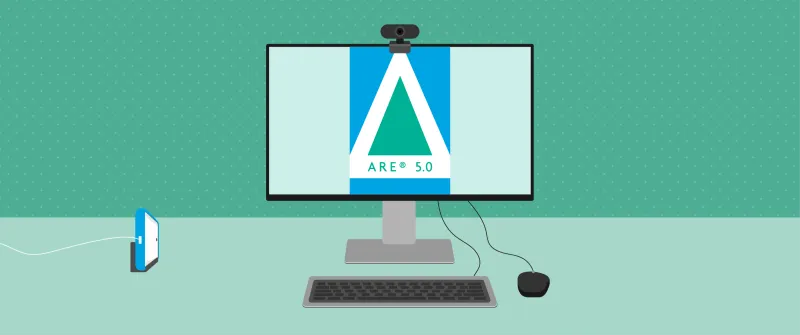
- Secondary Camera Policy: All candidates will be required to use a mobile device as a secondary camera. The mobile device camera must capture your entire computer screen, the full keyboard and mouse or trackpad, both hands while typing, and the side of your face.
- Windows Operating System Policy: Delivery of the exam through online proctoring will only be supported on computers running a Windows Operating System. Mac and Linux devices will no longer be accepted.
A new version of the ARE Guidelines reflecting both changes will become available in mid-May. If you have scheduled an online proctored appointment on or after June 1 and will not be able to comply with the requirements, you may reschedule your appointment at no cost to you. If you need help rescheduling your appointment, please contact us.
Secondary Camera on Mobile Device
If you are planning to test via online proctoring on or after June 1, you must set up a mobile device as a secondary camera. This extra camera is a new exam security measure that will be used in addition to the webcam on the computer that you use to take the test. The device you use for the secondary camera must be a smartphone with working front-facing and back-facing cameras. The device’s operating system must be iOS 12 or Android 8 or later.
Preparing Your Device
Before you prop up your phone, you should follow these instructions to prepare your device:
- Ensure your device is fully charged
- Check that your camera is working properly and clean your camera lens
- Enable “Do Not Disturb” mode
- Enable “Auto Rotate” or turn “Portrait Orientation Lock” off to allow for recording in landscape layout
- Close all apps and clear notifications
- Connect the device to a power outlet or adaptor (note that it cannot be connected to the computer being used for testing)
- Connect the device to the internet through WiFi. It is also recommended that your device is connected to a cellular network in case your WiFi connection is interrupted
Setting Up the Secondary Camera
During the online check-in process, you will scan a QR code that appears on your computer screen to begin the secondary camera setup. After allowing access to your microphone and camera, you will use your phone to verify your ID and complete a room scan. At this point, PSI’s online check-in specialist will help you adjust your device’s position directly to your right or left, approximately two to four feet away from your keyboard.
You may prop up your device with a sturdy, adjustable phone stand or heavy object (see Choosing an Appropriate Support Item section below). Your phone will need to be horizontal and in landscape mode to capture your entire computer screen, your full keyboard and mouse or trackpad, both hands while typing, and your side profile. You must stay within the camera frame during your exam and not stretch beyond it. Note: Candidates who use the device or alter its setup during breaks will need to complete the online check-in process again before returning to their exam. Learn more about the requirements for testing with a secondary camera on your mobile device.
To ensure your setup meets the requirements for online testing, you must complete a free, 30-minute test run with PSI. On or after June 1, proctors administering test runs will ensure your secondary camera meets all requirements. Be sure to schedule your test run far enough in advance of your actual ARE appointment to make any necessary changes to your setup.
Choosing an Appropriate Support Item
Once you’ve prepared your device, you may prop it up with a sturdy, adjustable phone stand or heavy object. Your phone support item cannot contain or hide materials, and it should be easy to examine using a camera. Other electronic devices, items with writing or labels on them (inside or out), any reference or study materials, homemade stands, adhesives like tape or putty, or unstable items like a plastic cup will not be allowed as a support item. Though NCARB prefers the use of a phone stand, other items are also accepted. Accepted support items include (but are not limited to):
- Phone stands, including charging stands (preferred)
- Charging stands may not include a display and can only be used to support and charge the phone. If the stand supports multiple devices, all other devices must be removed and not accessible during the exam
- Mugs
- Clear jars
- Water bottles without labels
Windows Operating System
If you are planning to test via online proctoring on or after June 1, you must use a device with a native (OEM) Windows Operating System (i.e., not a Mac device running Windows). If you have scheduled an online proctored appointment on or after June 1 and will not be able to secure a device with a Windows Operating System, you may reschedule your appointment at no cost to you. If you need help rescheduling your appointment, please contact us.
Reminder: April 2026 Policy Changes
In addition, several updates to the Architect Registration Examination® (ARE®) will go into effect on April 27, 2026:
- Exam Objective Adjustments: NCARB will make minor adjustments to 12 of the 91 exam objectives identified in the ARE 5.0 Guidelines. These adjustments are limited to small clarifying updates and, in some cases, narrowing the competency expectations assessed in the exam to align with the Competency Standard. Learn more about the specific exam objective changes and description adjustments.
- Refreshed Case Studies: The format of the exam’s case studies will also be refined, with the goal of making case studies more efficient for candidates. Effective April 27, case studies will feature fewer total resources and fewer items per individual case study—reducing exam loading times as well as time spent reviewing case study resources during the exam. You should still expect to see the same total number of case study items per exam division.
- Software Update: Candidates testing on or after April 27, 2026, should also notice reduced item loading times due to updated exam delivery software.
NCARB has released an updated version of the ARE Guidelines, effective April 27, 2026, as well as updated divisional practice exams that reflect these changes. The changes will not impact the ARE’s overall division structure, number of items per division, or testing time per division. Candidates’ passed divisions, including divisions reinstated through the retirement of the former rolling clock policy, will not be impacted.
If you are testing between now and April 26, 2026, you should continue preparing for your exam as planned, referencing the current versions of the ARE Guidelines and practice exams. For individuals testing on or after April 27, 2026, note that NCARB does not expect these changes to affect how you prepare for the exam. The main difference you may notice will be in the case study format, which is intended to be more efficient for candidates. Read answers to the top questions we’ve received about the April 27 changes.